Unicode Bugs That Look Like Business Logic Bugs

A customer import creates a duplicate that looks identical to an existing record. A display name fails a length check even though the user can count fewer characters than the form allows. A reference lookup works on a developer's machine and fails when the request runs under another culture. These incidents usually arrive as application bugs. Someone checks the duplicate detection, the validation rule or the query. The strings look right in the debugger, so attention moves elsewhere. The problem can start much earlier, the application hasnt defined what it means for two pieces of text to be equal, or what it means by a character.
C# gives us APIs for several different interpretations. Choosing one is part of the field's contract. A person's name, a machine generated reference and a search query can require quite different rules, even when all three arrive as string. The examples below target modern .NET, including .NET 10. Unicode escapes are intentional where seeing the exact representation helps explain the failure.
The duplicate nobody can see
Consider two names arriving from different systems:
var first = "Jos\u00E9";
var second = "Jose\u0301";

Console.WriteLine(first);         // José
Console.WriteLine(second);        // José
Console.WriteLine(first.Length);  // 4
Console.WriteLine(second.Length); // 5

Console.WriteLine(string.Equals(
    first, second, StringComparison.Ordinal)); // False
The first string contains a precomposed é. The second contains an e followed by a combining acute accent. They are canonically equivalent Unicode sequences, but their UTF-16 representations differ. That difference is enough to produce two entries in an ordinal dictionary:
var importedNames = new HashSet<string>(StringComparer.Ordinal)
{
    first,
    second
};

Console.WriteLine(importedNames.Count); // 2
The collection is behaving consistently with its comparer. The application expected a different definition of equality. For a field whose contract treats canonical equivalents as equal, normalise both values into the same form before comparing them. .NET exposes this through String.Normalize.
using System.Text;

var firstKey = first.Normalize(NormalizationForm.FormC);
var secondKey = second.Normalize(NormalizationForm.FormC);

Console.WriteLine(string.Equals(
    firstKey, secondKey, StringComparison.Ordinal)); // True
This doesnt establish that two customer records belong to the same person. Names aren't unique identities. It establishes that these two textual representations become equal under the chosen rule. Customer matching still needs the application's actual identity evidence. Thats useful during an import investigation. You can fix inconsistent string handling without quietly turning "same name" into "same customer".
Normalisation is a policy decision
Unicode defines canonical and compatibility normalisation. NFC, exposed as NormalizationForm.FormC, deals with canonical equivalence. NFKC, exposed as FormKC, also folds compatibility distinctions. The Unicode normalisation specification explains the difference and cautions against applying compatibility normalisation indiscriminately.
For example:
using System.Text;

var reference = "Order-\u2460"; // Order-①

Console.WriteLine(reference.Normalize(NormalizationForm.FormC));
// Order-①

Console.WriteLine(reference.Normalize(NormalizationForm.FormKC));
// Order-1
If Order-① and Order-1 are distinct identifiers in an upstream system, applying NFKC during ingestion merges a distinction that system made deliberately. If your own identifier specification explicitly treats those forms as equivalent, the transformation may be appropriate. A generic CleanString() method cannot make that decision for every field in the application. For an imported record, Id make the original value and any derived matching key separate concepts. Preserve the source representation when reconciliation requires it, then derive a key using a documented policy for that particular source and field. Apply the same policy when writing the key and when looking it up. Avoid gradually accumulating transformations because each one fixes a single support ticket. Trimming, removing accents, changing case and collapsing whitespace can each merge previously distinct values. Once a derived key becomes part of identity, changing that algorithm becomes a data migration.
What does a character limit count?
In .NET, a char is a UTF-16 code unit. Some Unicode scalar values require two of them. A user-perceived character can in turn contain several scalar values. Rune represents a scalar value; StringInfo provides text element operations for grapheme clusters.
Those are different counting units:
using System.Globalization;
using System.Text;

Show("e\u0301");                  // e + combining acute accent
Show("\U0001F600");              // grinning face
Show("\U0001F1EE\U0001F1EA");   // Irish flag
Show("\U0001F469\u200D\U0001F4BB"); // woman technologist

static void Show(string value)
{
    var scalarCount = 0;
    foreach (var rune in value.EnumerateRunes())
        scalarCount++;

    var textElements = new StringInfo(value).LengthInTextElements;
    var utf8Bytes = Encoding.UTF8.GetByteCount(value);

    Console.WriteLine(
        $"UTF-16={value.Length}, scalars={scalarCount}, " +
        $"text elements={textElements}, UTF-8 bytes={utf8Bytes}");
}
For these well formed examples on modern .NET, the counts are:
UTF-16=2, scalars=2, text elements=1, UTF-8 bytes=3
UTF-16=2, scalars=1, text elements=1, UTF-8 bytes=4
UTF-16=4, scalars=2, text elements=1, UTF-8 bytes=8
UTF-16=5, scalars=3, text elements=1, UTF-8 bytes=11
If a form promises a maximum of twenty characters in a display name. A rule written as value.Length <= 20 measures code units. That may disagree with what the person entering the name sees. If the product intends grapheme clusters, use that unit explicitly:
using System.Globalization;

static bool FitsDisplayNameLimit(string value, int maximum)
{
    ArgumentOutOfRangeException.ThrowIfNegative(maximum);
    return new StringInfo(value).LengthInTextElements <= maximum;
}
StringInfo is appropriate for this segmentation task, but a grapheme count still doesnt measure rendered width. A name that fits a character limit can overflow a narrow control. Layout needs to handle the actual rendered text. Theres also a storage concern. A grapheme can contain many combining marks, so a small text element count doesnt imply a small payload. Keep a separate technical bound on input size, and reject excessively large input before doing further text processing. A user facing character limit and an infrastructure size limit serve separate requirements.
Truncation can cut through the text
A substring operation uses UTF-16 offsets. Cutting at an arbitrary index can leave half of a surrogate pair:
var label = "A\U0001F600B"; // A😀B
var preview = label[..2];
Console.WriteLine(char.IsHighSurrogate(preview[^1])); // True
The preview ends with an unpaired high surrogate. An encoder or renderer may replace it, reject it or display an unexpected symbol. Moving to rune boundaries avoids splitting a scalar value, but it can still split a combining sequence or an emoji sequence. For a preview measured in text elements, use the boundaries supplied by StringInfo:
using System.Globalization;

static string TakeTextElements(string value, int maximum)
{
    ArgumentOutOfRangeException.ThrowIfNegative(maximum);
    var starts = StringInfo.ParseCombiningCharacters(value);
    return starts.Length <= maximum
        ? value
        : value[..starts[maximum]];
}

Console.WriteLine(TakeTextElements("A\U0001F600B", 2)); // A😀
Console.WriteLine(TakeTextElements("e\u0301x", 1));     // é
This helper assumes well formed input and allocates an array of boundaries. It is a straightforward option for bounded UI strings. It also returns only the prefix, if the product wants an ellipsis included within the limit, reserve space for that explicitly. Don't apply preview truncation to stored identifiers. A shortened identifier can become a different valid identifier or collide with another record. Reject an oversized identifier and report the problem to the caller.
The lookup that changes with culture
Case conversion can depend on language. Turkish casing provides a compact example:
using System.Globalization;

var culture = CultureInfo.GetCultureInfo("tr-TR");
var supplied = "invoice";

Console.WriteLine(supplied.ToUpper(culture)); // İNVOİCE
Console.WriteLine(supplied.ToUpper(culture) == "INVOICE"); // False

Console.WriteLine(string.Equals(
    supplied,
    "INVOICE",
    StringComparison.OrdinalIgnoreCase)); // True
The casing is correct for the specified culture. The mistake would be using that transformation to interpret a machine token whose spelling is defined independently of the user's language. For non linguistic tokens, choose Ordinal or OrdinalIgnoreCase according to the contract. Microsofts string comparison guidance recommends explicit comparison semantics and distinguishes symbolic comparisons from linguistic ones.
var handlers = new Dictionary<string, Action>(StringComparer.OrdinalIgnoreCase)
{
    ["invoice"] = () => Console.WriteLine("Import invoice")
};

if (handlers.TryGetValue("INVOICE", out var handle))
    handle();
The dictionary now applies the same comparer to hashing and equality. There's no dependency on a request's current culture. OrdinalIgnoreCase doesn't perform Unicode normalisation for you. If a field permits Unicode and requires canonical equivalence as well as case insensitive matching, those are two explicit parts of its policy. For a human facing alphabetical list, linguistic sorting may be exactly what you want. Pick the relevant culture for that view. A display ordering doesn't have to become the application's identity rule.
Make a reference format explicit
Some fields don't need arbitrary Unicode. An integration might define a scheme code as one to forty ASCII letters, digits or hyphens, with letter case ignored. That is a useful opportunity to make the accepted alphabet obvious:
public static class SchemeCodePolicy
{
    public static bool TryCreateKey(string? input, out string key)
    {
        key = string.Empty;
        if (input is null || input.Length is < 1 or > 40)
            return false;

        foreach (var character in input)
        {
            var allowed = character is
                >= 'A' and <= 'Z' or
                >= 'a' and <= 'z' or
                >= '0' and <= '9' or '-';

            if (!allowed)
                return false;
        }

        key = input.ToUpperInvariant();
        return true;
    }
}
Here, Length is a suitable count because every accepted character occupies one UTF-16 code unit and one UTF-8 byte. Uppercasing is predictable over this deliberately restricted alphabet. The policy does not trim spaces or replace punctuation. motor-01 becomes MOTOR-01, while motor–01, containing an en dash, is rejected. If the contract later requires an alphanumeric first character or forbids trailing hyphens, add those rules deliberately. This restriction belongs to the scheme code specification. Applying it to a person's name would exclude valid names for no relevant reason. It is equally important not to generalise this example to externally defined identifiers such as email addresses or URLs. Those have their own syntax and comparison rules. Use the relevant protocol's rules rather than assigning every string the same casing strategy.
The database can disagree
Application comparisons don't automatically determine database comparisons. EF Core can translate a C# equality expression into SQL equality, whose behaviour is governed by the database's collation. Microsoft's EF Core collation documentation explains this boundary and the index implications of query level collation changes. That creates an easy inconsistency, a HashSet<string> in the importer distinguishes two values, while the database's unique index treats them as equal. The import passes its pre-check and fails during insertion.
The reverse can also happen. Application code can consider two values equal while storage allows both. A lookup may then return more than one row for an identity the application thought was unique. For our scheme code, persist the canonical ASCII key, query by that key and enforce uniqueness in the database within the right scope. If scheme codes are unique per tenant, the unique key must include the tenant. Every write path must apply the same validation and canonicalisation.An application side "does it already exist?" check still cannot enforce uniqueness under concurrent requests. Keep the unique constraint and translate its violation into the appropriate application result.
For unrestricted Unicode keys, don't assume that selecting a binary collation makes every SQL comparison identical to .NET ordinal comparison. Test the actual database type, provider and comparison behaviour, including padding rules. Define the stored representation and index semantics together. Avoid fixing one query by applying ToLower() to an indexed column without checking the execution plan. A string correctness fix can introduce a performance problem if it prevents the intended index access.
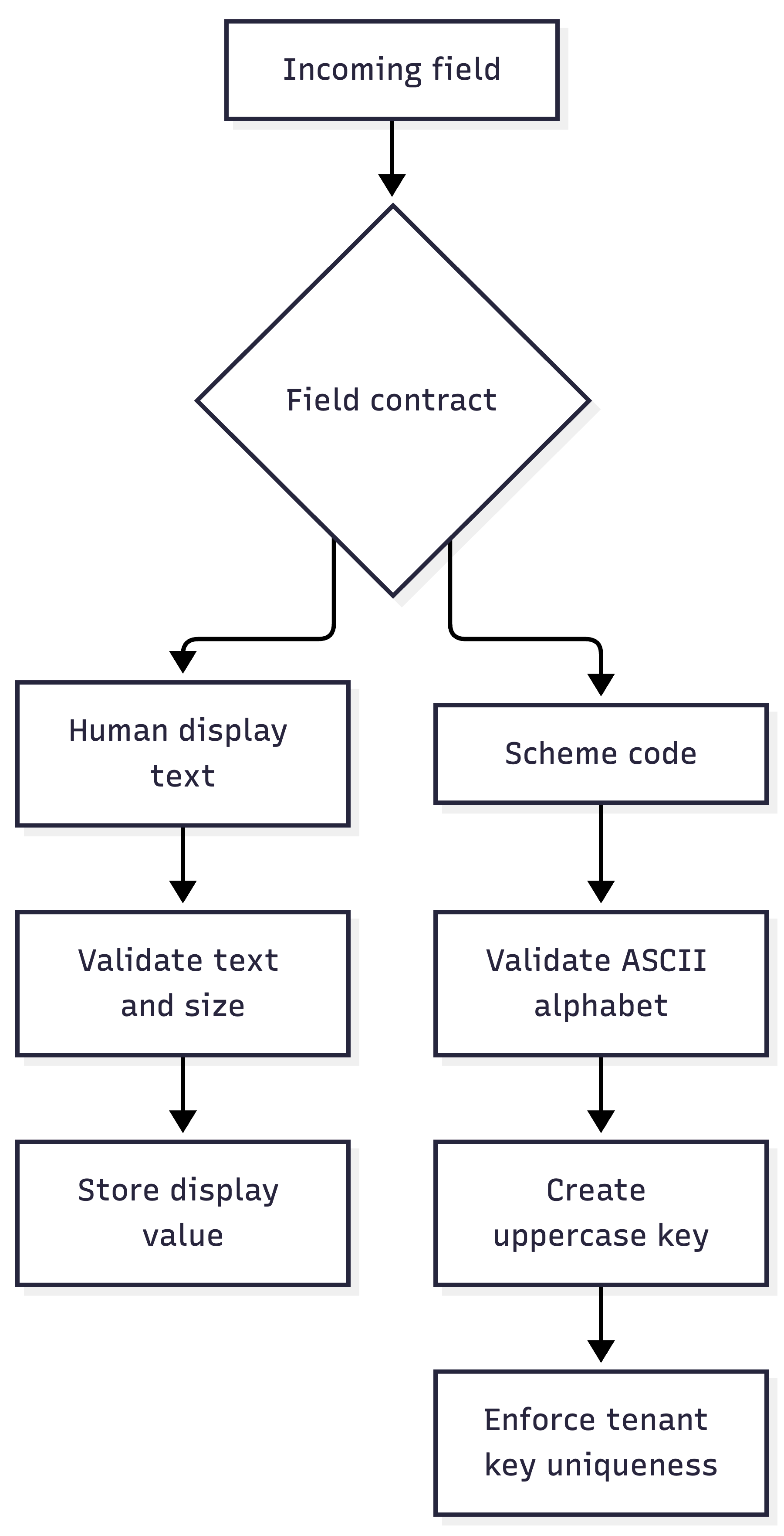
The branches are intentional. A display field and a machine key should not be forced through one shared collection of cleanup operations.
Lookalikes survive normalisation
Canonical equivalence also differs from visual similarity. Latin a and Cyrillic а can look extremely similar in a font while remaining different characters:
using System.Text;

var latin = "pay";
var mixed = "p\u0430y"; // Cyrillic small letter a

Console.WriteLine(string.Equals(
    latin.Normalize(NormalizationForm.FormKC),
    mixed.Normalize(NormalizationForm.FormKC),
    StringComparison.Ordinal)); // False
NFKC doesnt turn every lookalike into the same character. Unicode's security mechanisms specification treats confusable detection and identifier restrictions as additional concerns. For a deliberately ASCII scheme code, the explicit alphabet already rejects the Cyrillic character. For international usernames or organisation names, the policy needs more care. Mixed scripts may warrant a warning or review in a sensitive identifier, but blanket rejection can also exclude legitimate text. Confusable detection can help flag a suspicious display name. It shouldn't silently merge accounts or replace a stable account ID. Authorisation should continue to use the actual identity, independently of how similar two labels appear. The same caution applies to removing invisible characters. The zero width joiner in the technologist emoji above participates in the sequence. Deleting every format character as a universal cleanup step can alter legitimate text.
Check the decoding boundary
An import can be damaged before any comparison runs. If the source bytes use one encoding and the importer assumes another, normalisation cannot reconstruct the intended text reliably. For a source explicitly contracted as UTF-8, strict decoding makes malformed byte sequences visible:
using System.Text;

var utf8 = new UTF8Encoding(
    encoderShouldEmitUTF8Identifier: false,
    throwOnInvalidBytes: true);

var invalid = new byte[] { 0xC3, 0x28 };

try
{
    var text = utf8.GetString(invalid);
}
catch (DecoderFallbackException)
{
    Console.WriteLine("The import contains invalid UTF-8.");
}
The UTF8Encoding constructor supports throwing on invalid input instead of replacing it. The setting makes a broken UTF-8 feed easier to diagnose; it doesn't detect every wrong-encoding file. Some byte sequences are valid under multiple encodings and mean different things in each. Confirm the source encoding as part of the integration contract. If exact original bytes matter for evidence or signatures, retain them separately. Decoding and later re-encoding a string is not a substitute for preserving the signed payload. Similarly, normalisation belongs after input validation and before deriving the application's comparison key. It must not be inserted into a signature verification path unless the signed protocol explicitly defines that transformation.
Make the difference visible
When a reported mismatch looks impossible, inspect the representation. For a small synthetic reproduction, printing UTF-16 units makes differences that the rendered text hides immediately visible:
static void DumpUtf16(string value)
{
    for (var index = 0; index < value.Length; index++)
        Console.WriteLine($"{index}: 0x{(int)value[index]:X4}");
}

DumpUtf16("Jose\u0301");
0: 0x004A
1: 0x006F
2: 0x0073
3: 0x0065
4: 0x0301
For customer data, dont turn this into unrestricted logging of names or imported records. Use a controlled diagnostic path, or reproduce the same representation issue with non-sensitive values. The regression suite should exercise the contract that failed. For canonical name matching, compare composed and decomposed forms. For scheme codes, verify that casing is stable across cultures and that punctuation lookalikes are rejected. For preview generation, exercise a surrogate pair and a combining sequence. For persisted identity, test actual database uniqueness and lookup behaviour rather than only the in-memory comparer.
These snippets illustrate those cases, they are not a supplied, executed .NET test project. Run them against the runtime and database configuration your application deploys, particularly where linguistic comparison or segmentation behaviour is involved. A string field becomes easier to reason about once its rules are explicit. Define its accepted representation, comparison semantics and length unit, then carry those decisions through validation, collections, storage and lookup. The next "impossible duplicate" has somewhere concrete to investigate.